Override Wordpress Function register_sidebar In Child Theme

I was trying to adjust the sidebar header tags recently on a client’s website. The site is a wordpress site and the theme (Titan) was wrapping all of the widget titles in <h2> tags. Since h2 tags can help search engines determine what your pages are about, wrapping the titles of the sidebar in them isn’t really indicative of individual page content. I wanted to use h2 tags for each post when they were relevant and wanted to remove them from the sidebar widget titles. Initially I thought this would be simple since I could just edit the sidebar.php file where the header tags were wrapping the output. So I went about doing that like this: However, when I went to see the output the header tags were still h2 tags. I spent a while racking my brain and looking all over for ways to change this. I did everything from removing the entire sidebar by commenting out the code to see if was output elsewhere (it wasn’t).
Function In Parent Theme Overriding Child Theme Function
Eventually I figured out that there was a function overriding this causing the tags to be h2 tags after considerable digging. This thread on the wordpress forums, was very helpful in initially figuring this out. The file was actually not even titled functions.php which if I was very familiar with the Titan theme would probably have known but since it was in the functions directory. The file was actually called titan-extend.php and located. The file is located in titan_pro/functions/titan-extend.php. I tried editing the file directly just to make sure and sure enough, that was it. Here is what it looked like: 
Adjusting Parent Theme and Child Theme Loading Order
Once I found the function that was causing this, I figured I could edit the functions file in the child theme and would be all set. So I went ahead and did that, but the child function wasn’t overriding the parent function. I realized that the child function would be loaded first and then the parent function loaded so that the function in the parent theme would override the child theme function. I found this post that was very helpful in starting this process: Helpful post for overriding functions but that didn’t completely address the issue since the child theme was loading first and the parent theme would override it. In order to address this, I had to have wordpress load the parent function first and then unregister the function controlling this and then load the child functions. I finally figured it all out and brought it together with the following code: 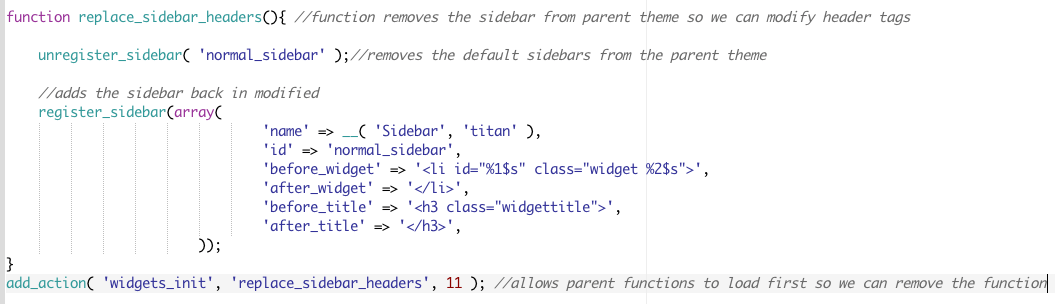 I had no idea when I first wanted to make this simple change that it would be so involved, but now I do and can reference this for future similar issues. I hope it is helpful for anyone else that finds themselves in this situation with their wordpress theme or if they are using the Titan theme.